

In this article, I’ll explain how to make a Discord interactions bot, that can respond to slash commands in N8N.
I’ll cover how to setup the url in Discord Developer portal, and how to verify the signature with N8N.
I won’t cover here how to install N8N, how to create a Discord application and how to connect the Discord app to your very own server.
Since we’ll need a Node external library, this only works with N8N self hosted. You can’t import libraries in N8N Cloud (docs). Maybe you can verify the signature without the
tweetnacllibrary but I’m only gonna provide the code with a specific library here.
1 - N8N setup
We need to add an environment variable to our N8N instance so it can use the tweetnacl node library.
NODE_FUNCTION_ALLOW_EXTERNAL=tweetnacl
If you’re using docker compose for your N8N installation, just pass it inside the environment block in your docker-compose.yml.
Now, restart your docker compose.
2 - Create the workflow in N8N
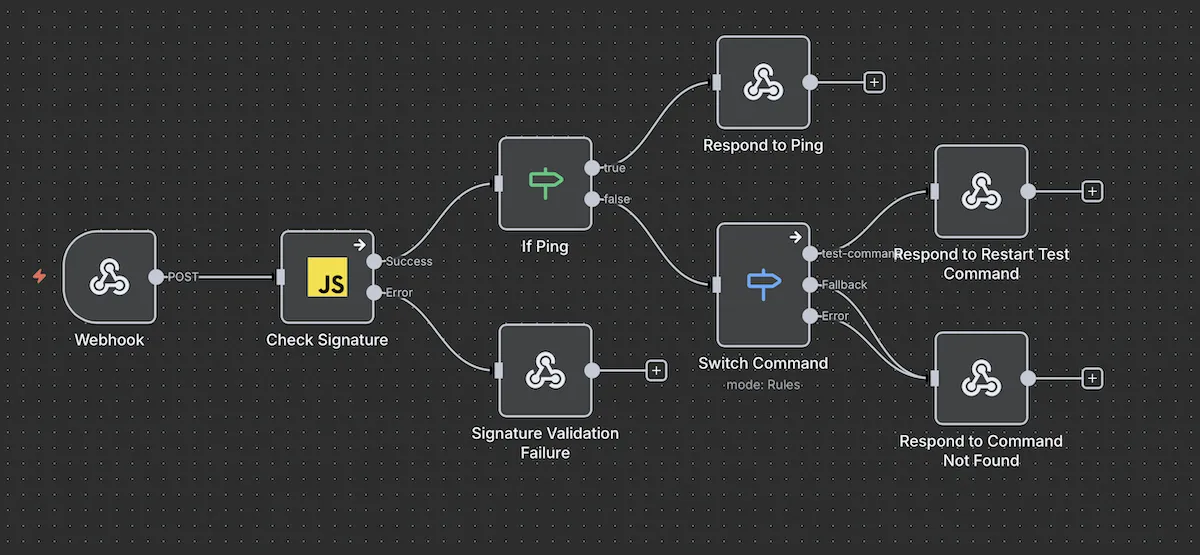
First, download the workflow json here and save it: Download
Now, create a new workflow in N8N.
After that, click on the 3 dots on the right of the save button in the topbar, and click Import from file…
Import the previously downloaded json.
Great, now you have the base workflow, we just need to make a small change for it to work.
3 - Import your public key into the workflow
Head over to the Discord developer portal and click on your application.
In the General Informations panel, you should see a Public Key. Click copy.
Now, go back to your N8N workflow, double click on the block Check Signature, and replace “YOUR_PUBLIC_KEY“ by your key. (2nd line)
const PUBLIC_KEY = "YOUR_PUBLIC_KEY"; // Paste it here !
Save and activate your workflow.
Double click on the Webhook block and copy the production url.
Almost done ! Now, we just need to provide the webhook url to Discord, so they can verify our webhook.
4 - Add the webhook to Discord
Go back again to Discord developer portal, and in General Informations, scroll until you see the field Interactions Endpoint URL.
Paste your previously copied production url, and tadam, the webhook should be verified !
Now, you can create your slash commands using Discord Api, and edit the Switch Command block to route onto different things based on the slash command used by your users !